[ARCHIVE] How can I download previous versions of Exelis VIS software?
Anonym
THIS INFORMATION ONLY PERTAINS TO SOFTWARE VERSIONS IDL 8.5, ENVI 5.3 AND PRIOR
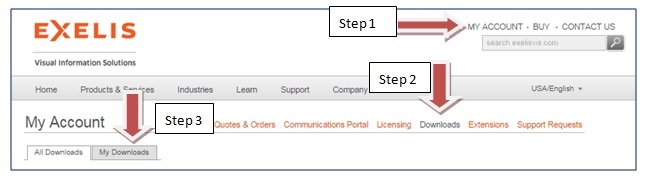
Step 1: Log into the Exelis VIS website by selecting the My Account link
Step 2: Select the Downloads link
Step 3: Select the My Download tab
You should now see a list of Downloads of all versions that are associated to you including previous versions. Specifically, you need to have licenses or be associated to licenses of the specific version you want to download.
If you do not see the previous version you are looking for on the My Downloads tab, please contact Technical Support and specify the product, version, platform and operating system (i.e., ENVI 5.0 Linux 64 bit).
Created/review 10/07/2014, 12/23/14 KK, JD, DB