INTERNAL VIS USE ONLY ] ENVI Engine and IDL Engine with GSF -- Maintenance Contract and Licensing Configuration in CRM: Non-production server licenses
Anonym
Beginning with GSF 2.1 / ENVI Engine (formerly "ESE"
or "ENVI Services Engine") 5.4 -- GSF/ENVI Engine purchases, and
all associated module licenses that are intended to be used with a customer's
Production ENVI Engine server, should, by default, receive a duplicate
number of license seats for explicit use on that customer's non-production (i.e.,
staging or testing) ENVI Engine server system.
|
IDL ENGINE (511ISELIC and 511ISETLA)
This policy to provide additional module licenses for a
non-production server also applies to purchases of GSF 2.1 / IDL Engine 8.6, and
later.
For IDL module licenses such as IDL DICOM R/W Toolkit, IDL
DICOM Network Services, IDL Advance Math And Stats, and IDL Dataminer, please
check with our Contracts Department to be sure that we are complying with any
special third-party vendor module license agreements.
|
Please note that the GSF product associated with an ENVI
Engine license purchase is itself not licensed, and should be designated with a
quantity of "1" unit in CRM, without regard to the quantity/quantity
seats provided for the ENVI Engine license.
Upon purchase, we provide the organization with download access
to the GSF product installer (515GSFLIC or 515GSFTLA). And for ENVI Engine (510ESELIC
or 510ESETLA), the customer will receive download access to the ENVI product
installer (yes, the regular ENVI Desktop product :)) and licensing to enable
use of the ENVI Engine within the GSF framework.
|
ENVI+IDL DESKTOP LICENSES
Note that ENVI+IDL Desktop licenses are *not
* included in the purchase price of a GSF/ENVI Engine purchase. If a customer
needs access to ENVI+IDL in order to develop programs to run as Tasks on
their GSF/ENVI Engine server, the product will need to be purchased separately.
In this case, duplication of license seats for a non-production server does
not apply.
|
Example:
Suppose a customer purchases GSF and ENVI Engine with 4
workers, along with 4x ENVI ACM and 4x ENVI Feature Extraction licenses for use
with ENVI Engine. I this case, the customer would receive access to the
following license counts:
·
ENVI Engine license - 4 workers purchased:
8 license seats provided:
4 for production server, 4 for non-production server
·
ACM - 4 licenses purchased for use with GSF/ENVI Engine:
8 license seats provided:
4 for production server, 4 for non-production server
·
Feature Extraction - 4 licenses purchased for use with GSF/ENVI
Engine:
8 license seats provided:
4 for production server, 4 for non-production server
·
GSF:
Quantity 1 (no associated
licensing)
CRM Maintenance Contract Configuration
|
CRM Maintenance Contract record
field terms:
- "Quantity" field: Unit purchase quantity.
- "Quantity Seats" field: Quantity of usable
license seats.
- "Maintenance Contract Products" table: Table
grid on the maintenance contract page that can optionally contain additional
license product numbers that translate into separate/additional line item
license activation codes for that maintenance contract ID.
|
Maintenance
Contract Configuration for ENVI Engine Product:
To help convey to customers that half of the provided
licenses are meant for a separate destination, the ENVI Engine and associated
ENVI module maintenance contract records in the CRM should be configured with the
Quantity and the Quantity Seats values set to purchased quantity, for example:

Next, to provide the non-production server licensing, you you'll
need to add a new instance of the license Product Number (part number) item,
with the same license quantity as purchased, to the "Maintenance Contract
Products" table on the maintenance contract page.
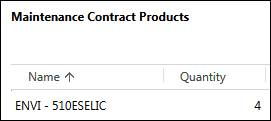
This maintenance contract configuration will result in an
activation code (order or Maintenance ID) email with two separate activation
code line items -- one for the production environment and one for the
non-production environment -- each with the original purchased quantity, for
example:

Maintenance Contract
Configuration for Module Licenses used with Enterprise Products:
For ENVI product module licenses (like ACM and Feature
Extraction) that are purchased for use with GSF/ENVI Engine, the Quantity,
Quantity Seats and the Maintenance Contract Products item should be configured
in the same manner as that for the ENVI Engine maintenance contract.
Written by JU
(3/3/2017), Reviewed by JB (3/4/2017)