7
Writing Effective Prompts for ENVI Agent
ENVI® Agent helps ENVI users be more efficient by helping to plan and execute remote sensing workflows. Getting the most out of ENVI Agent starts with how you frame your requests. Because the agent actively translates natural language into multi-step remote sensing workflows, clear and context-rich prompts determine the speed and precision of your results. Being specific about your requests and providing as much context as possible helps the underlying Large Language Model (LLM) plan and execute ENVI tasks appropriately.
ENVI Agent is an agentic AI application, which means that it:
- Tries to understand the full context of your requests.
- Builds a plan to run assigned tasks in the proper sequence.
- Makes autonomous decisions without continuous user input.
- Adapts to new situations and changes its direction as needed.
These powerful capabilities depend, in part, on the details and guidance that you provide up front. The following video provides tips on writing effective prompts that improve efficiency and productivity when working with ENVI Agent.
To illustrate other ways that ENVI Agent can be used, here are some actual prompts we used to create various products. They demonstrate that there are often multiple ways to craft a request and yield the same answer.
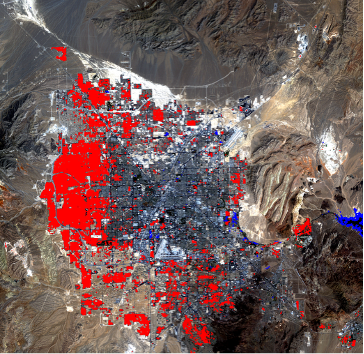
Urban Growth Using Landsat Data
Prompt:
“Using ENVI, help me develop a change detection workflow between the Landsat images in this folder:
C:\my-data\
I want to use a spectral index to identify built-up areas to demonstrate urban changes. Please organize outputs in a ‘results’ sub-folder.”
Data:
Two Landsat images, preprocessed and spatially subset to the same area of interest around Las Vegas.
Result:
Oil Spill Detection Using SAR
Requires ENVI SARscape 6.3.1
Prompt:
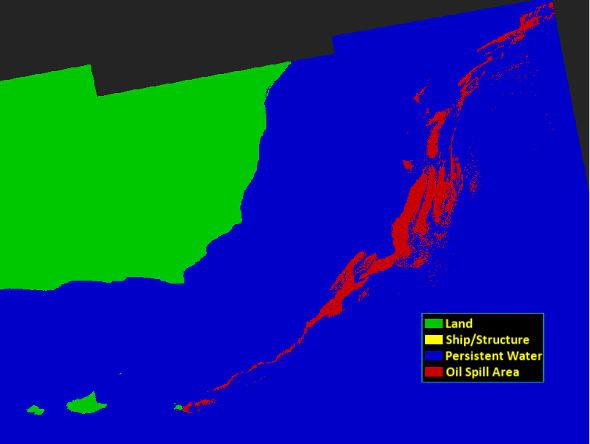
“Using ENVI and SARscape, can you detect oil spills using the data in this folder?
D:\sar_data \oil_spill
Place the final image in a ‘results’ sub-folder to help organize intermediate files.”
Data:
A Sentinel-1 Single Look Complex (SLC) image from August 7, 2026, covering Oman and the Arabian Sea.
Result:
Creating an ENVI Modeler Workflow
Prompt:
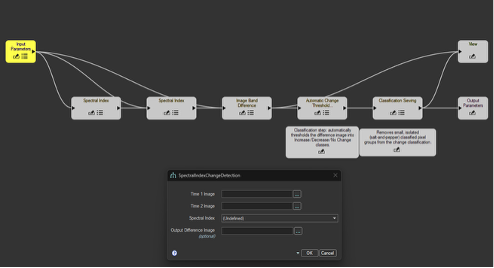
“Create an ENVI Modeler workflow that automates change detection between two images using spectral indices. Use the following items as input parameters: input images, spectral index, and the path to the difference image. Please add a classification step and classification sieving to the workflow.”
Result:
ENVI Agent generated the following ENVI Modeler workflow:
These examples show different ways you can create an effective prompt to quickly create value-added products in ENVI Agent. We can’t wait to see what you create!
If you don’t have ENVI Agent and are interested in what it can do for you and your organization, reach out to your ENVI account manager for more information.