[INTERNAL] How to test if a SCP node destination is available or not in the DICOM Network Services
This Help Article describes how a SCP node can be tested to check if it is available or not using the echo SCU service.
On the machine from which you need to access to the SCP node:
1. Launch the DICOM Network Services in local mode
- Select Start -> Programs -> IDL x.x -> DICOM Network Services
- Select the Local option.
OR
Enter the command: DICOMEX_NET at the IDL prompt.
2. Select the Configuration tab,
3. In the Echo SCU window, select the remote SCP node you need to test (for example RSI_AE_STOR_SCP)
4. Click on the ECHO button
5. Example of a successful echo:
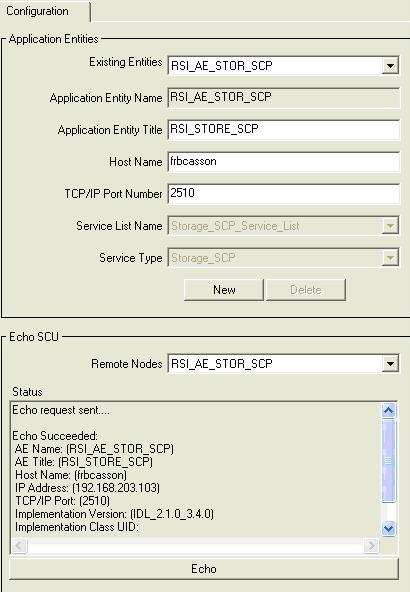
a. the RSI_AE_STOR_SCP Service is running on the remote server machine called frbcasson
b. this RSI_AE_STOR_SCP Service is defined on the client machine from which we want to test if this service is available (see the Application Entities window):
- the AET and AEN of the service which needs to be tested are defined
- the hostname of the server machine is recorded
- the port number through which the machines can communicate is defined