X

NV5 Geospatial Blog

Each month, NV5 Geospatial posts new blog content across a variety of categories. Browse our latest posts below to learn about important geospatial information or use the search bar to find a specific topic or author. Stay informed of the latest blog posts, events, and technologies by joining our email list!


Mapping Earthquake Deformation in Taiwan With ENVI

Mapping Earthquake Deformation in Taiwan With ENVI

12/15/2025

Unlocking Critical Insights With ENVI® Tools Taiwan sits at the junction of major tectonic plates and regularly experiences powerful earthquakes. Understanding how the ground moves during these events is essential for disaster preparedness, public safety, and building community resilience. But traditional approaches like field... Read More >

Comparing Amplitude and Coherence Time Series With ICEYE US GTR Data and ENVI SARscape

Comparing Amplitude and Coherence Time Series With ICEYE US GTR Data and ENVI SARscape

12/3/2025

Large commercial SAR satellite constellations have opened a new era for persistent Earth monitoring, giving analysts the ability to move beyond simple two-image comparisons into robust time series analysis. By acquiring SAR data with near-identical geometry every 24 hours, Ground Track Repeat (GTR) missions minimize geometric decorrelation,... Read More >

Empowering D&I Analysts to Maximize the Value of SAR

Empowering D&I Analysts to Maximize the Value of SAR

12/1/2025

Defense and intelligence (D&I) analysts rely on high-resolution imagery with frequent revisit times to effectively monitor operational areas. While optical imagery is valuable, it faces limitations from cloud cover, smoke, and in some cases, infrequent revisit times. These challenges can hinder timely and accurate data collection and... Read More >

Easily Share Workflows With the Analytics Repository

Easily Share Workflows With the Analytics Repository

10/27/2025

With the recent release of ENVI® 6.2 and the Analytics Repository, it’s now easier than ever to create and share image processing workflows across your organization. With that in mind, we wrote this blog to: Introduce the Analytics Repository Describe how you can use ENVI’s interactive workflows to... Read More >

Deploy, Share, Repeat: AI Meets the Analytics Repository

Deploy, Share, Repeat: AI Meets the Analytics Repository

10/13/2025

The upcoming release of ENVI® Deep Learning 4.0 makes it easier than ever to import, deploy, and share AI models, including industry-standard ONNX models, using the integrated Analytics Repository. Whether you're building deep learning models in PyTorch, TensorFlow, or using ENVI’s native model creation tools, ENVI... Read More >

1345678910Last
19504 Rate this article:
4.0

Creating Image Tiles in ENVI

Anonym

I want to preview a new feature that will be available in the upcoming ENVI 6.0 release: a series of “Dice Raster” tools than can separate images into multiple tiles. 
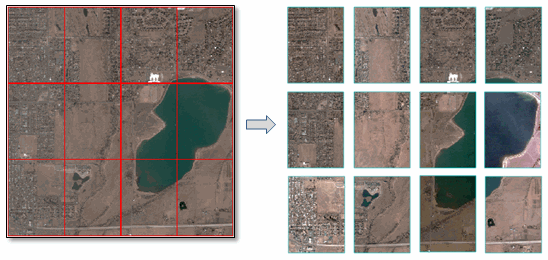
You will have four different options for specifying how to separate (or dice) images. The first is indicating how many tiles to create in the X and Y direction. For example, I diced the  above image into four tiles in the X direction and three tiles in the Y direction, for a total of 12 tiles. 

Another option is to create tiles based on linear distance. In this case, the image must be georeferenced to a standard or RPC map projection and you must know the units associated with the projection. The following example shows an image georeferenced to a UTM Zone 13N WGS-84 projection, split into tiles that are 1000 x 1000 meters. 
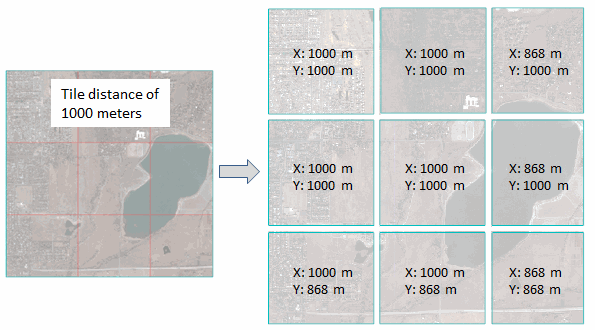
In most cases the tiles in the last row and column will be smaller than the specified distance, as this example shows.

Another option is to dice an image by a given number of pixels in the X and Y direction. This is similar to the tile distance option.

Finally, you can create image tiles based on the spatial extent of vector records in a shapefile. Here is an example of how you might use this feature. Let’s say you have a Landsat scene and you want to separate it into tiles that correspond to USGS 7.5-minute topographic quadrangles. This screen capture shows a Landsat TM scene of the Grand Canyon along with a shapefile of Arizona quadrangle map boundaries (available from Data.gov).
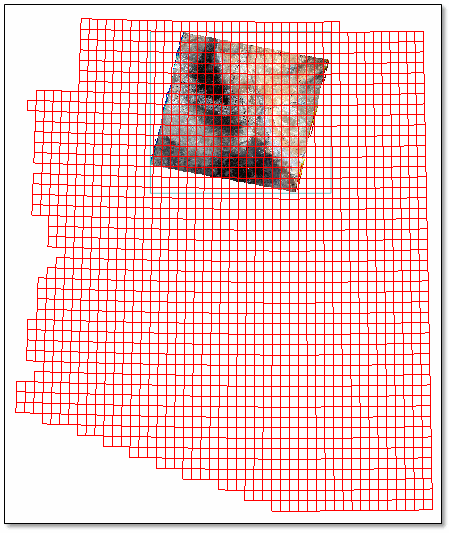
Since there are so many polygons in this shapefile, I created a vector subset of only the records that overlap the Landsat image. Open the Attribute Viewer, then click in the display to select the records that you want to keep. The Attribute Viewer highlights the selected records.
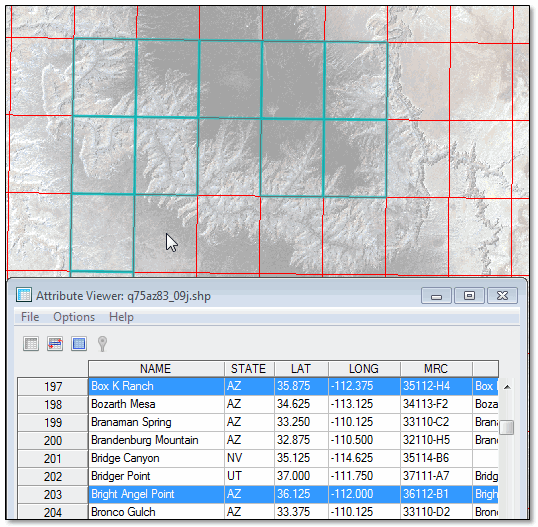
Then choose the File > Save Selected Records to a new Shapefile menu option. Now we have a shapefile that only contains quadrangle map boundaries around the Landsat scene.
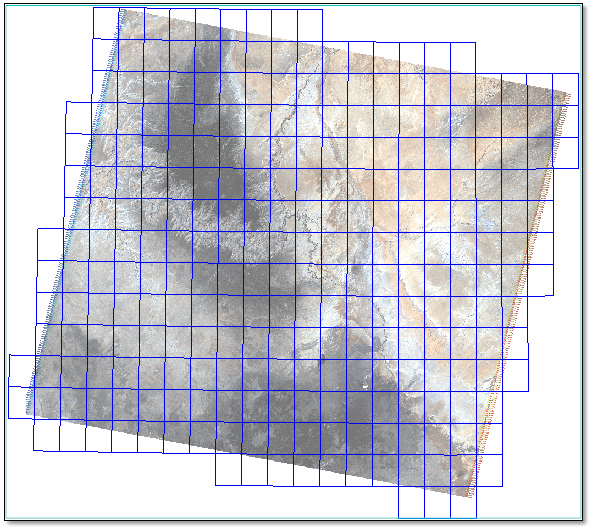

Now we’re ready to create the tiles. The Dice Raster tools are available from the Toolbox under Raster Management > Raster Dicer. Use the Dice Raster by Vector tool to separate the Landsat image into separate tiles based on the quadrangle boundaries.
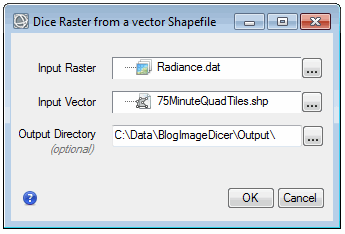
Since the shapefile had 270 polygon records, the Dice Raster tool will create 270 separate images. Here is one of the resulting image tiles that corresponds to the House Rock Springs Quadrangle boundary, displayed with map grid line annotations (also available in ENVI 6.0):
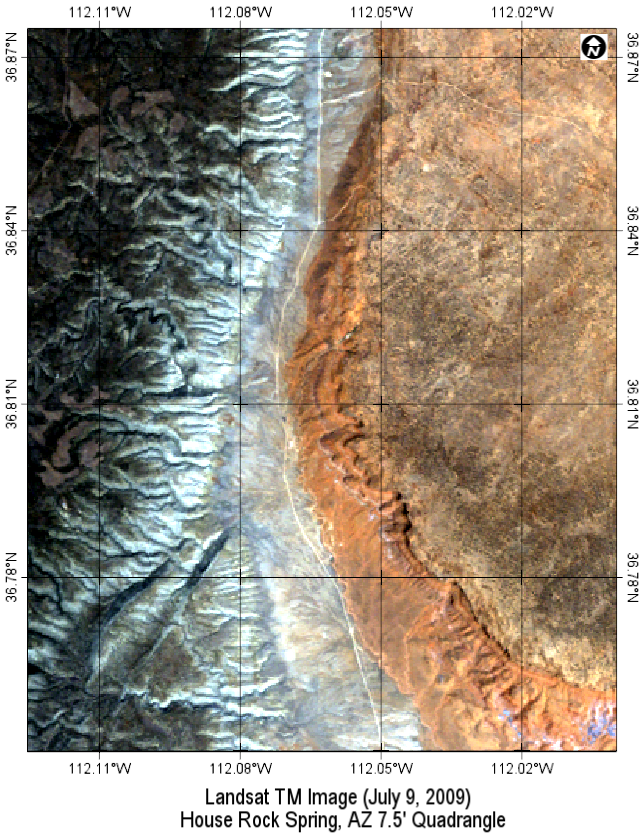
You can also use the Dice Raster tools, for example, to split an image of a large study area into smaller areas of analysis. They are just one of many versatile and easy-to-use features that will be available in the next release of ENVI.

1 comments on article "Creating Image Tiles in ENVI"

Avatar image

wishes choice

The website is lovingly serviced and saved as much as date. So it should be, thanks for sharing this with us i am also a blogger i am working on my site we have all types of wishes like anniversary,birthday and many more things check it now.

wisheschoice

http://wisheschoice.com/

Please login or register to post comments.