X

NV5 Geospatial Blog

Each month, NV5 Geospatial posts new blog content across a variety of categories. Browse our latest posts below to learn about important geospatial information or use the search bar to find a specific topic or author. Stay informed of the latest blog posts, events, and technologies by joining our email list!


Comparing Amplitude and Coherence Time Series With ICEYE US GTR Data and ENVI SARscape

Comparing Amplitude and Coherence Time Series With ICEYE US GTR Data and ENVI SARscape

12/3/2025

Large commercial SAR satellite constellations have opened a new era for persistent Earth monitoring, giving analysts the ability to move beyond simple two-image comparisons into robust time series analysis. By acquiring SAR data with near-identical geometry every 24 hours, Ground Track Repeat (GTR) missions minimize geometric decorrelation,... Read More >

Empowering D&I Analysts to Maximize the Value of SAR

Empowering D&I Analysts to Maximize the Value of SAR

12/1/2025

Defense and intelligence (D&I) analysts rely on high-resolution imagery with frequent revisit times to effectively monitor operational areas. While optical imagery is valuable, it faces limitations from cloud cover, smoke, and in some cases, infrequent revisit times. These challenges can hinder timely and accurate data collection and... Read More >

Easily Share Workflows With the Analytics Repository

Easily Share Workflows With the Analytics Repository

10/27/2025

With the recent release of ENVI® 6.2 and the Analytics Repository, it’s now easier than ever to create and share image processing workflows across your organization. With that in mind, we wrote this blog to: Introduce the Analytics Repository Describe how you can use ENVI’s interactive workflows to... Read More >

Deploy, Share, Repeat: AI Meets the Analytics Repository

Deploy, Share, Repeat: AI Meets the Analytics Repository

10/13/2025

The upcoming release of ENVI® Deep Learning 4.0 makes it easier than ever to import, deploy, and share AI models, including industry-standard ONNX models, using the integrated Analytics Repository. Whether you're building deep learning models in PyTorch, TensorFlow, or using ENVI’s native model creation tools, ENVI... Read More >

Blazing a trail: SaraniaSat-led Team Shapes the Future of Space-Based Analytics

Blazing a trail: SaraniaSat-led Team Shapes the Future of Space-Based Analytics

10/13/2025

On July 24, 2025, a unique international partnership of SaraniaSat, NV5 Geospatial Software, BruhnBruhn Innovation (BBI), Netnod, and Hewlett Packard Enterprise (HPE) achieved something unprecedented: a true demonstration of cloud-native computing onboard the International Space Station (ISS) (Fig. 1). Figure 1. Hewlett... Read More >

1345678910Last
19226 Rate this article:
No rating

Using EXIF Metadata to Show Photo Locations in Google Earth, via IDL

Jim Pendleton

Have you ever needed an IDL API for retrieving a geographic location at which a digital camera photo was taken, one stored in a standard format such as a TIFF or JPEG?

On a lovely spring morning, I shot this photo of a flowering tree in full bloom outside our office building in Boulder, Colorado. When I grow older and daft-er, how will I remember where the photo was taken, plus or minus GPS accuracy?

 

IDL 8.4.1 includes a new READ_EXIF function for that purpose.


The input is the path to the image file, and the output is a HASH containing much useful metadata.


If GPS tagging was enabled on the device on which the photo was acquired, its contents will be stored in the inelegantly-named but standard key "ifd0_subifd0_GPS".


IDL> r = read_exif(dialog_pickfile())


IDL> if r.haskey('ifd0_subifd0_GPS') then GPSInfo = r['ifd0_subifd0_GPS']

IDL> print, GPSInfo, /implied

{

    "ifd0_subifd0_GPS": {

        "Exif_GPSInfo_GPSLongitude": [105.00000000000000, 14.000000000000000, 10.588900000000001],

        "Exif_GPSInfo_GPSAltitudeRef": 0,

        "Exif_GPSInfo_GPSLatitude": [40.000000000000000, 1.0000000000000000, 13.553400000000000],

        "Exif_GPSInfo_GPSAltitude": 0.00000000000000000,

        "Exif_GPSInfo_GPSTimeStamp": [14.000000000000000, 53.000000000000000, 34.000000000000000],

        "Exif_GPSInfo_GPSProcessingMethod": "ASCII",

        "Exif_GPSInfo_GPSVersionID": [2, 2, 0, 0],

        "Exif_GPSInfo_GPSDateStamp": "2015:04:06",

        "Exif_GPSInfo_GPSLatitudeRef": "N",

        "Exif_GPSInfo_GPSLongitudeRef": "W"

    }

}


The tag names are long and cumbersome, but they use a standard prefix.


IDL> pre = 'Exif_GPSInfo_GPS'


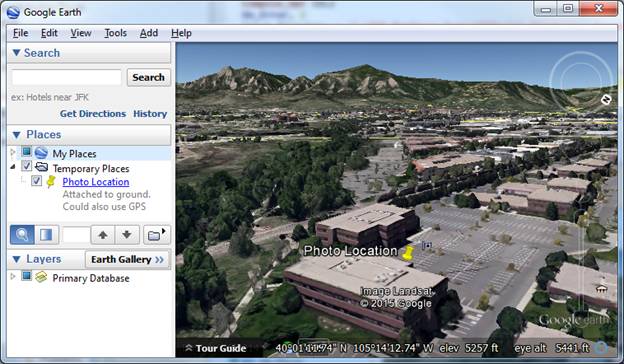
Let's show the location in Google Earth. First extract the longitude and latitude in decimal degrees.


IDL> Lon =Total(Float(GPSInfo[pre+'Longitude'])/[1.,60.,3600.])


IDL> Lon *= GPSInfo[pre+'LongitudeRef'].Compare('W') eq 0 ? -1 : 1

IDL> Lat =Total(Float(GPSInfo[pre+'Latitude'])/[1.,60.,3600.])

IDL> Lat *= GPSInfo[pre+'LatitudeRef'].Compare('N') eq 0 ? 1 : -1


Next, create some KML containing the placemarker location. 


IDL> l = '<?xml version="1.0" encoding="UTF-8"?>'


IDL> l += '<kml xmlns="http://www.opengis.net/kml/2.2">'

IDL> l += '<Placemark>'

IDL> l += '<name>Photo Location</name>'

IDL> l += '<description>Attached to ground.  Could also use GPS altitude.</description>'

IDL> l += '<Point>'

IDL> l += '<coordinates>' + StrJoin([Lon, Lat, 0], ',')  + '</coordinates>'

IDL> l += '</Point>'

IDL> l += '</Placemark>'

IDL> l += '</kml>'


Write the KML to a temporary file.


IDL> tempfile = filepath('test.kml', /tmp)


IDL> openw, lun, tempfile, /get_lun & printf, lun, l & free_lun, lun


If ".kml" is registered as a known extension on your computer, you should be able to simply SPAWN the path to the file.


IDL> spawn, tempfile, /hide, /nowait


Be aware that GPS tagging of photos is generally disabled by default on most mobile devices these days to support a greater level of privacy.  To toggle GPS tagging on, one generally needs to locate a "Settings" or "Options" menu associated with the camera application on a particular device.


Please login or register to post comments.