Maintaining Backward Compatibility in IDL 8.6 - Keep Calm And Read Your Release Notes
One of the "benefits" of being a NV5 Geospatial (formerly Harris) insider is access to pre-release candidates of the commercial products developed by our engineering group.
We in Custom Software Solutions are sometimes the canaries in the coal mine, learning on occasion that an "undocumented feature" that we had used benignly or even to our advantage has been removed from the language in a newer release. Generally, these changes are justifiable.
Where to Find Release Notes
Sometimes it's not enough to look at the documentation center's What's New help page to learn of all these changes. An additional source of information, generally prepared after the "What's New" documentation has gone to press, is located in a place other than your IDL or ENVI installation's documentation subdirectory.
This file includes information about supported platforms and potential backward-compatibility issues.
If you have received a Harris product installation DVD, check the info subdirectory on the DVD itself for the release notes files.
If your installation was downloaded from the Download and License Center, you or your site's designated license administrator will need to retrieve the release notes from a link that is separate from the product installer.
Downloading Release Notes
After logging in, select the "Harris" link near the bottom of the web page, under "Browse My Software and Documentation".
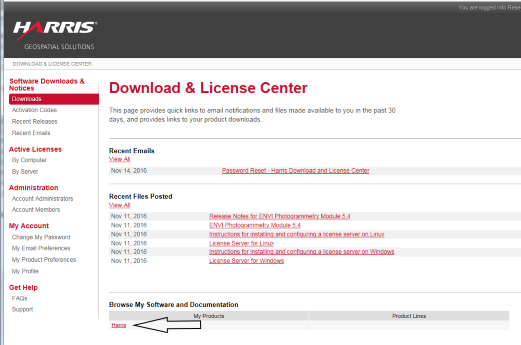
Select the "IDL" link, that pops up in a new list in the "Product Lines" column.

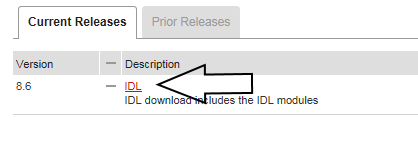
Select the "IDL" link in the "Current Releases" tab.
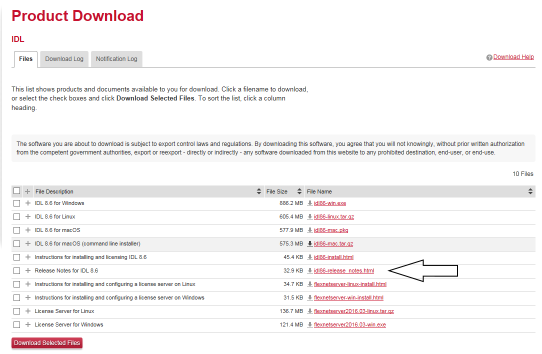
On the "Product Download" page, select the appropriate item for the Release Notes document.
An Example Backward Compatibility Note
Recently, I discovered some of my routines were using an admittedly illegal syntax involving the "_REF_EXTRA" keyword passing mechanism. The code wasn't so much illegal, as it was ignored. And one could argue the compiler should have complained about it from the time that _REF_EXTRA was added to the language. For example,
function MyRoutine, _REF_EXTRA=extra
MySubroutine, _REF_EXTRA=extra
end
Can you spot the problem?
The _REF_EXTRA keyword is only intended to appear in the declaration of a function or procedure.Within the body of the code, you should always use the _EXTRA keyword when making calls to other routines.
In the form shown above, the code is basically ignored at execution time. It serves no useful purpose.
Up until IDL 8.6, illegal use of the _REF_EXTRA syntax would simply be skipped by the compiler and interpreter. In the example above, MySubroutine would be called without any keywords, regardless of what was passed to MyRoutine.
In IDL 8.6, the compiler has been beefed up to complain about the invalid syntax. If you have code that fits this pattern your code will not compile. You may want to simply remove the flagged code because it has never been operational. Or you may want to change the syntax.
function MyRoutine, _REF_EXTRA=extra
MySubroutine, _EXTRA=extra
end
Carefully consider the implications of changing the keyword, however. Modifying the syntax will also alter the behavior. You may end up modifying keywords on output that you hadn't intended to change!