The IDLgrVRML object allows you to save the contents of an Object Graphics hierarchy into a VRML 2.0 format file. The graphics tree can only contain a single view due to limitations in the VRML specification. The resulting VRML file is interactive and allows you to explore the geometry interactively using a VRML browser.
Note: Objects or subclasses of this type can not be saved or restored.
Aspect ratios are difficult to duplicate as they can be browser dependent. The object is limited to the primitives supported by VRML. Texture maps (and images) will be inlined into the output file. While this will generate large VRML files, the files are fully self-contained.
Several entities cannot be translated perfectly. These include:
-
IDLgrImage - Rotation and Z buffer behavior are not completely supported. Image objects will be converted into texture mapped polygons. BLEND_FUNCTION is not completely supported (only binary srcAlpha,1-srcAlpha) This function is applied automatically if an alpha channel is present. It is also very browser dependent. Channel masks are not supported. Tiled images are not supported.
-
IDLgrPolygon and IDLgrSurface - Hidden line/hidden point display, color and vertex color blending with texture colors, and bottom color are not supported. Shading may be browser dependent. Front face culling is not supported and back face culling is only supported at the browser’s discretion. The AMBIENT material property is not supported.
-
IDLgrLight - Lighting scope and intensity may be browser dependent.
-
IDLgrText - Text using the ONGLASS property is only supported for the initial view.
-
IDLgrViewgroup, IDLgrScene, IDLgrVolume - These objects are not supported.
-
IDLgrPalette - Palette objects are simulated using an RGB color model.
-
IDLgrPattern - Only solid or clear patterns are supported.
-
IDLgrFont, IDLgrSymbol - The THICK property is not supported.
-
IDLgrPolyline, IDLgrSymbol, IDLgrSurface, IDLgrPolygon and IDLgrPlot - Line attributes (thickness, linestyle) are not supported.
-
IDLgrView - Z-clipping control, aspect ratio preservation, the LOCATION property, and orthographic projections are not supported.
-
Destination Objects - The COLOR_MODEL property is not fully supported in Indexed Color mode, when using a SHADER_RANGE (an RGB model will be substituted instead). The QUALITY property is not supported.
Example
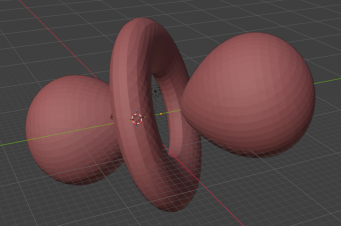
Construct a 3D model of the dz2 shell for hydrogen, then export to a VRML file:
vertices = ex_spher_harm(polygons = poly)
oPoly = IDLgrPolygon(vertices, polygon=poly, color=[180,50,50])
oModel = IDLgrModel()
oModel.Add, oPoly
oView = IDLgrView()
oView.Add, oModel
obj = IDLgrVRML(filename='hydrogen.wrl')
obj.Draw, oView
obj = 0
Superclasses
IDLitComponent
Properties
Objects of this class have the following properties. In addition, objects of this class inherit the properties of all superclasses of this class.
ALL (Get only)
An anonymous structure containing the values of all of the retrievable properties associated with this object.
COLOR_MODEL (Get/Init)
An integer value or enumerated list item that determines the color model for the buffer:
|
Value |
Property Sheet Value
|
Description |
|
0 |
RGB |
RGB (default) |
|
1 |
Indexed |
Color indexed |
DIMENSIONS
A two-element integer vector of the form [width, height] to specify the dimensions of the window in units specified by the UNITS property. The default is [640,480].
Note: The only use of this property is to support the use of normalized coordinates for the dimensions of the IDLgrView object passed to the IDLgrVRML::Draw method.
FILENAME
A string that specifies the name of a file into which the vector data will be saved. The default is idl.wrl.
GRAPHICS_TREE
An object reference of type IDLgrView. If this property is set to a valid object reference, calling the Draw method on the destination object with no arguments will cause the object reference associated with this property to be drawn. If this object is valid and the destination object is destroyed, this object reference will be destroyed as well. By default the GRAPHICS_TREE property is set equal to the null-object. .
N_COLORS (Get/Init)
An integer that specifies the number of colors (between 2 and 256) to be used if COLOR_MODEL is set to indexed.
PALETTE
An object reference to a palette object (an instance of the IDLgrPalette object class) that specifies the red, green, and blue values that are to be loaded into the buffer’s color lookup table.
Note: Objects specified via this property are not automatically cleaned up when the IDLgrVRML object is destroyed.
This property is registered as a user-defined property, but it is hidden by default.
RESOLUTION
A two-element floating-point vector of the form [xres, yres] specifying the device resolution in centimeters per pixel.
Note: This property is used for text scaling and partial aspect ratio preservation only. The default value is [0.0352778, 0.0352778] (72 DPI).
This property is registered as a user-defined property, but it is hidden by default.
SCREEN_DIMENSIONS (Get only)
A two-element integer vector of the form [width, height] specifying the dimensions of the overall screen dimensions for the screen with which this object associated. The screen dimensions are measured in device units.
UNITS
An integer that indicates the units of measure for the DIMENSIONS property. Valid values are:
- 0 = Device (the default)
- 1 = Inches
- 2 = Centimeters
- 3 = Normalized (relative to 1600 x 1200)
WORLDINFO (Init only)
A list of strings for the info field of the VRML WorldInfo node. The default is an empty string, ''.
WORLDTITLE (Init only)
A string containing the title for the VRML WorldInfo node, TITLE field. The default is 'IDL VRML file'.
Methods
This class has the following methods:
In addition, this class inherits the methods of its superclasses (if any).
IDLgrVRML::Draw
The IDLgrVRML::Draw procedure method draws the given picture to this graphics destination.
Syntax
Obj->[IDLgrVRML::]Draw [, Picture]
Arguments
Picture
The view (an instance of an IDLgrView object) to be drawn. If the view has a LOCATION property, it is ignored.
Tip: Instead of using the Picture argument, it is strongly recommended that you set the GRAPHICS_TREE property and call the ::Draw method without an argument. This allows the IDLgrVRML to automatically clean up the graphics tree when it is destroyed. If you do use the Picture argument, then you are responsible for cleaning up the graphics tree (automatic garbage collection will not work because of the parent/child circular references within the graphics hierarchy).
Keywords
None
IDLgrVRML::GetProperty
The IDLgrVRML::GetProperty procedure method retrieves the value of a property or group of properties for the VRML object.
Syntax
Obj->[IDLgrVRML::]GetProperty[, PROPERTY=variable]
Arguments
None
Keywords
To retrieve the value of a property, specify the property name as a keyword set equal to a named variable that will contain the value of the property.
Any keyword not recognized is passed to this object’s superclass.
IDLgrVRML::Init
The IDLgrVRML::Init function method initializes the VRML object. This creates an object that will convert object hierarchies rendered to it into VRML format files.
Note: Init methods are special lifecycle methods, and as such cannot be called outside the context of object creation. This means that in most cases, you cannot call the Init method directly. There is one exception to this rule: if you write your own subclass of this class, you can call the Init method from within the Init method of the subclass.
Syntax
Obj = OBJ_NEW('IDLgrVRML' [, PROPERTY=value])
or
Result = Obj->[IDLgrVRML::]Init( [, PROPERTY=value]) (In a lifecycle method only.)
Return Value
When this method is called indirectly, as part of the call to the OBJ_NEW function, the return value is an object reference to the newly-created object.
When called directly within a subclass Init method, the return value is 1 if initialization was successful, or zero otherwise.
Arguments
None
Keywords
Any property listed under IDLgrVRML Properties that contains the word “Yes” in the “Init” column of the properties table can be initialized during object creation using this method. To initialize the value of a property, specify the property name as a keyword set equal to the appropriate property value.
All other keywords are passed to the superclass of this object.
IDLgrVRML::SetProperty
The IDLgrVRML::SetProperty procedure method sets the value of a property or group of properties for the VRML world.
Syntax
Obj->[IDLgrVRML::]SetProperty[, PROPERTY=value]
Arguments
None
Keywords
To set the value of a property, specify the property name as a keyword set equal to the appropriate property value.
Version History
|
5.1 |
Introduced |
| 9.3 |
Remove docs for Cleanup, GetDeviceInfo, GetFontnames, GetTextDimensions methods. These are deprecated but will continue to work.
|