The DisplayText function method displays text in a resizable dialog window. The content type is auto-detected at display and it supports plain text, json, and html.
Example
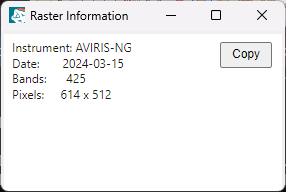
e = envi()
lines = ['Instrument: AVIRIS-NG', $
'Date: 2024-03-15', $
'Bands: 425', $
'Pixels: 614 x 512']
envi.ui.DisplayText, lines, TITLE='Raster Information'
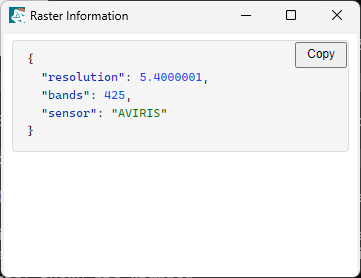
meta = Hash('sensor', 'AVIRIS', 'bands', 425, 'resolution', 5.4)
Envi.ui.DisplayText, meta, /MONO, FONT_SIZE=13, TITLE='Raster Information'
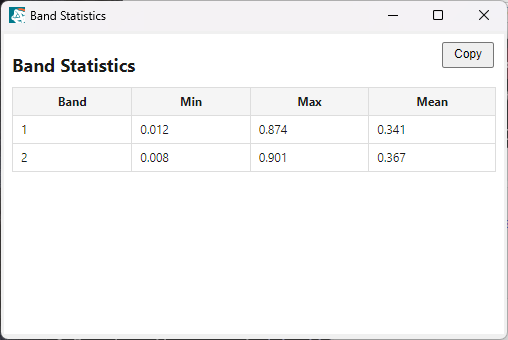
html = ['<h2>Band Statistics</h2>
', $
'<table>', $
'<tr><th>Band</th><th>Min</th><th>Max</th><th>Mean</th></tr>', $
'<tr><td>1</td><td>0.012</td><td>0.874</td><td>0.341</td></tr>', $
'<tr><td>2</td><td>0.008</td><td>0.901</td><td>0.367</td></tr>', $
'</table>']
Envi.ui.DisplayText, html, XSIZE=500, YSIZE=300, TITLE='Band Statistics'
Syntax
ENVIUI.DisplayText(Str [, Keywords=value])
Arguments
Str
The string or array of strings to display.
Keywords
ERROR (optional)
Set this keyword to a named variable that will contain any error message issued during execution of this routine. If no error occurs, the ERROR variable will be set to a null string (''). If an error occurs and the routine is a function, then the function result will be undefined.
When this keyword is not set and an error occurs, ENVI returns to the caller and execution halts. In this case, the error message is contained within !ERROR_STATE and can be caught using IDL's CATCH routine. See IDL Help for more information on !ERROR_STATE and CATCH.
See Manage Errors for more information on error handling in ENVI programming.
FLOATING (optional)
Set this keyword to have the window float above its group leader. The default is 1 (floating).
FONT_SIZE (optional)
The body font size in pixels.
GROUP_LEADER (optional)
Specify the widget ID of the parent widget. The default is envi.widget_id.
MONO (optional)
Set this keyword to use a monospace font (Cascadia Code / Consolas) instead of the default system font (Segoe UI).
THEME (optional)
Specify the color theme: light (default) or dark.
XSIZE (optional)
The width of the browser widget in pixels. The default is 800.
YSIZE (optional)
The height of the browser widget in pixels. Default: 600
Version History
See Also
ENVIUI