This task configures an ONNX model for use with ENVI Deep Learning. It includes parameters for metadata, model structure requirements, preprocessing and postprocessing scripts, and other settings. Configuring the ONNX model ensures it is properly prepared for integration, execution, and documentation in ENVI. Input and output configurations are supported, to streamline the model preparation requirements with ENVI.
Example
e = ENVI()
modelFile = "model.envi.onnx"
preprocessorFile = "preprocessor.py"
postprocessorFile = "postprocessor.py"
outputModelFile = e.GetTemporaryFilename('.envi.onnx')
Task = ENVITask('ConfigureOnnxModel')
Task.INPUT_MODEL_URI = modelFile
Task.INPUT_PREPROCESSOR_URI = preprocessorFile
Task.INPUT_POSTPROCESSOR_URI = postprocessorFile
Task.MODEL_TYPE = "Object Detection"
Task.MODEL_ARCHITECTURE = "Retinanet"
Task.MODEL_NAME = "Code Example"
Task.MODEL_AUTHOR = "Example Corp."
Task.MODEL_VERSION = "1.0.0"
Task.MODEL_DATE = SYSTIME()
Task.MODEL_LICENSE = "Apache 2.0"
Task.MODEL_DESCRIPTION = ["This is an example for task ", "Configure ONNX Model."]
Task.TILE_OVERLAP = 52
Task.NUMBER_OF_BANDS = 3
Task.IMAGE_WIDTH = 256
Task.IMAGE_HEIGHT = 256
Task.CLASS_NAMES = ["class_1", "class_2", "class_3"]
Task.CLASS_COLORS = [[255,0,0], [0,255,0], [0,0,255]]
Task.WAVELENGTHS = [0.45, 0.55, 0.65]
Task.WAVELENGTH_UNITS = "Micrometers"
Task.OUTPUT_MODEL_URI = outputModelFile
Task.Execute
outputModel = Task.OUTPUT_MODEL
outputModel.GetProperty, $
MODEL_TYPE=modelType, $
MODEL_ARCHITECTURE=modelArchitecture, $
MODEL_NAME=modelName, $
MODEL_DESCRIPTION=modelDescription, $
MODEL_AUTHOR=modelAuthor, $
MODEL_VERSION=modelVersion, $
MODEL_DATE=modelDate, $
MODEL_LICENSE=modelLicense, $
METRICS=metrics, $
NUMBER_OF_BANDS=numberOfBands, $
IMAGE_WIDTH=imageWidth, $
IMAGE_HEIGHT=imageHeight, $
CLASS_NAMES=classNames, $
CLASS_COLORS=classColors, $
TILE_OVERLAP=tileOverlap, $
WAVELENGTHS=wavelength, $
WAVELENGTH_UNITS=wavelengthUnits
print, `Model Type: ${modelType}`
print, `Model Architecture: ${modelArchitecture}`
print, `Model Name: ${modelName}`
print, `Model Description: ${modelDescription}`
print, `Model Author: ${modelAuthor}`
print, `Model Version: ${modelVersion}`
print, `Model License: ${modelLicense}`
print, `Number of Bands: ${numberOfBands}`
print, `Image Width: ${imageWidth}`
print, `Image Height: ${imageHeight}`
print, `Class Names: ${classNames}`
print, `Class Colors: ${classColors}`
print, `Tile Overlap: ${tileOverlap}`
print, `Wavelengths: ${StrJoin(String(wavelength.ToArray(), FORMAT='(F0.4)'), ', ')}`
print, `Wavelength Units: ${wavelengthUnits}`
print, `Model Metrics: ${metrics}`
Syntax
Result = ENVITask('ConfigureOnnxModel ')
Input parameters (Set, Get): CLASS_COLORS, CLASS_NAMES, IMAGE_HEIGHT, IMAGE_WIDTH, INPUT_MODEL_URI, INPUT_POSTPROCESSOR_URI, INPUT_PREPROCESSOR_URI, MODEL_ARCHITECTURE, MODEL_AUTHOR, MODEL_DATE, MODEL_DESCRIPTION, MODEL_LICENSE, MODEL_NAME, MODEL_TYPE, MODEL_VERSION, NUMBER_OF_BANDS, OUTPUT_MODEL_URI, TILE_OVERLAP, WAVELENGTH_UNITS, WAVELENGTHS
Output parameters (Get only): OUTPUT_MODEL
Properties marked as "Set" are those that you can set to specific values. You can also retrieve their current values any time. Properties marked as "Get" are those whose values you can retrieve but not set.
Input Parameters
CLASS_COLORS (optional)
Specify an array of RGB triplets, where each triplet defines the color representation for a corresponding class label in CLASS_NAMES. These colors are used for visualization purposes, such as rendering segmentation masks or labeling detected objects.
CLASS_NAMES (required)
Specify an array of class labels that the ONNX model was previously trained to recognize. Each label corresponds to a specific feature or category in the dataset used for training.
IMAGE_HEIGHT (required)
Specify the height (in pixels) of the input image data required by the model. This parameter ensures that the input data dimensions are compatible with the model's architecture and preprocessing pipeline.
IMAGE_WIDTH (required)
Specify the width (in pixels) of the input image data required by the model. This parameter ensures that the input data dimensions are compatible with the model's architecture and preprocessing pipeline.
INPUT_MODEL_URI (required)
Specify the file path of a ONNX model, with extension (.onnx), to be used as the primary input for the task. This file serves as the source model for configuring, processing, or inference operation with ENVI.
INPUT_POSTPROCESSOR_URI (required)
Specify the file path of a Python script (.py) that implements the postprocessing logic required to interpret or transform the raw output of the ONNX model into a usable format.
INPUT_PREPROCESSOR_URI (required)
Specify the file path of a Python script (.py) that implements the preprocessing logic required for preparing input data to match the expected format of the ONNX model.
MODEL_ARCHITECTURE (required)
Specify an informal string that provides a general description of the architecture used to train the model converted to the ONNX format. This is primarily for reference purposes and does not influence the processing logic.
MODEL_AUTHOR (required)
Specify the individual or team responsible for training the model. This parameter identifies the contributor(s) to document their ownership, efforts, and expertise.
MODEL_DATE (optional)
Specify the date the ONNX model was created, trained, or finalized. For example: January 01, 2030. This parameter provides a timestamp for documentation, version tracking, and historical reference.
MODEL_DESCRIPTION (optional)
Specify a comprehensive summary of the ONNX model, including its purpose, key features, and any relevant details about its training or application. The description is documentation intended for the users of the model.
MODEL_LICENSE (optional)
Specify the license under which the model is distributed. This parameter ensures compliance with the legal and permitted use requirements associated with the model.
MODEL_NAME (required)
Specify the name of the ONNX model. This parameter serves as a human-readable identifier to distinguish between models and provide contextual information.
MODEL_TYPE (required)
Specify the deep learning model to use for the task. This parameter determines the method and output format of the analysis or processing. The options are:
- Grid
- Object Detection
- Pixel Segmentation
MODEL_VERSION (required)
Specify a semantic version format (MAJOR.MINOR.PATCH) for the trained model (for example, 1.0.0). The version may indicate the following:
- MAJOR: Breaking changes to the model
- MINOR: Compatibility or new features
- PATCH: Minor adjustments
Specify the version of the ONNX model (example: 1.0.0). This parameter is used to track the iteration or release of the model for documentation, debugging, and compatibility purposes. This number can be incremented if the model already exists and you are publishing a new version of it.
NUMBER_OF_BANDS (required)
Specify the number of spectral or data bands present in the input data. This parameter is used to define the dimensionality of the input data.
OUTPUT_MODEL_URI (required)
Specify the file path where the newly generated ONNX model will be saved. The new model will include the original functionality along with additional metadata provided to this task.
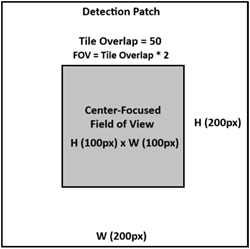
TILE_OVERLAP (optional)
Specify the number of pixels that will define a margin on all sides of each detection patch, forming a center-focused field of view (FOV). For example:
WAVELENGTH_UNITS (optional)
Specify the wavelength units with one of the following:
- Undefined
- Nanometers
- Micrometers
This is typically based on the type of data the model was trained with.
WAVELENGTHS (optional)
Specify an array of raster spectral wavelength values, one per band for the number of bands the model was trained with. Bands with matching wavelengths for INPUT_RASTER will be used during classification, if provided.
Output Parameters
OUTPUT_MODEL
Represents the configured model object referencing OUTPUT_MODEL_URI.
Methods
Execute
Parameter
ParameterNames
See ENVI Help for details on these ENVITask methods.
Properties
DESCRIPTION
DISPLAY_NAME
NAME
REVISION
TAGS
See the ENVITask topic in ENVI Help for details.
Version History
|
Deep Learning 4.0
|
Introduced |
See Also
ExtractDeepLearningOnnxModelFromFile Task