This task trains a deep learning model for object detection.
Example
Sample data files are available on our ENVI Tutorials web page. Click the "Deep Learning" link in the ENVI Tutorial Data section to download a .zip file containing the data. Extract the contents of the .zip file to a local directory. Files are located in the object_detection folder.
This example trains an object detection model to find parking spots with handicap signs painted on the pavement; for example:
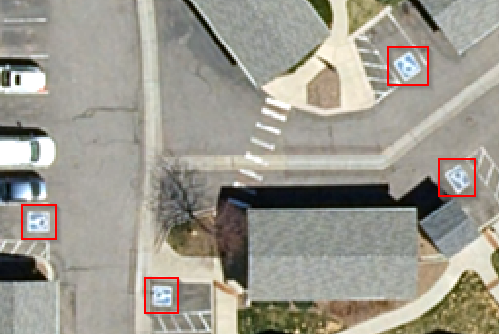
The code example will take several minutes to run. If you do not wish to run this example, a copy of the resulting model is available with the tutorial data mentioned above. The sample model is named ObjectDetectionModel_HandicapSpots.h5.
e = ENVI()
File1 = 'C:\MyTutorialFiles\DRCOG_AerialImage1.dat'
AnnFile1 = 'C:\MyTutorialFiles\Handicap_Parking_Spots1.anz'
Raster1 = e.OpenRaster(File1)
File2 = 'C:\MyTutorialFiles\DRCOG_AerialImage2.dat'
AnnFile2 = 'C:\MyTutorialFiles\Handicap_Parking_Spots2.anz'
Raster2 = e.OpenRaster(File2)
BuildODTask1 = ENVITask('BuildObjectDetectionRasterFromAnnotation')
BuildODTask1.INPUT_RASTER = Raster1
BuildODTask1.INPUT_ANNOTATION_URI = AnnFile1
BuildODTask1.Execute
BuildODTask2 = ENVITask('BuildObjectDetectionRasterFromAnnotation')
BuildODTask2.INPUT_RASTER = Raster2
BuildODTask2.INPUT_ANNOTATION_URI = AnnFile2
BuildODTask2.Execute
Task = ENVITask('TrainDeepLearningObjectModel')
Task.TRAINING_RASTERS = [BuildODTask1.OUTPUT_RASTER]
Task.VALIDATION_RASTERS = [BuildODTask2.OUTPUT_RASTER]
Task.EPOCHS = 60
Task.PATCHES_PER_BATCH = 2
Task.FEATURE_PATCH_PERCENTAGE = 1.0
Task.OUTPUT_MODEL_URI = e.GetTemporaryFilename('h5')
Task.Execute
Syntax
Result = ENVITask('TrainDeepLearningObjectDetectionModel')
Input parameters (Set, Get): AUGMENT_FLIP, AUGMENT_ROTATION, AUGMENT_SCALE, BACKGROUND_PATCH_RATIO, EPOCHS, FEATURE_PATCH_PERCENTAGE, GRADIENT_MAX_NORMALIZATION, LEARNING_RATE, MODEL_ARCHITECTURE, MODEL_AUTHOR, MODEL_DESCRIPTION, MODEL_LICENSE, MODEL_NAME, MODEL_VERSION, OUTPUT_LAST_MODEL_URI, OUTPUT_MODEL_URI, PAD_SMALL_FEATURES, PATCHES_PER_BATCH, TRAINING_RASTERS, VALIDATION_RASTERS
Output parameters (Get only): OUTPUT_LAST_MODEL, OUTPUT_MODEL
Properties marked as "Set" are those that you can set to specific values. You can also retrieve their current values any time. Properties marked as "Get" are those whose values you can retrieve but not set.
Input Parameters
AUGMENT_FLIP (optional)
Specify whether to flip vertically and horizontally 50% of the time during data augmentation.
AUGMENT_ROTATION (optional)
Specify whether to rotate training inputs during data augmentation.The default value is 'true'.
AUGMENT_SCALE (optional)
Specify whether to scale training inputs during data augmentation.The default value is 'true'.
BACKGROUND_PATCH_RATIO (optional)
Specify the ratio of background patches containing zero features to patches with features. A ratio of 1.0 for 100 patches with features would provide 100 patches without features. The default value is 0.15. In cases where features are sparse in a training raster, the training can be biased by empty patches throughout. This property allows you to restrict the number of empty patches, relative to those that contain features.
EPOCHS (optional)
An epoch is a full pass of the entire training dataset through the algorithm's learning process. Specify the number of Epochs to run. Training inputs are adjusted at the end of each epoch. The default value is 25.
FEATURE_PATCH_PERCENTAGE (optional)
Specify the percentage of patches containing labeled features to use during training. Values should range from 0 to 1. This applies to both the training and validation datasets. The default value is 1, which means that 100% of the patches that contain features will be used for training. The number of resulting patches is used as input to the BACKGROUND_PATCH_RATIO.
Example: Suppose that an object detection raster has 50 patches that contain labeled features. A FEATURE_PATCH_PERCENTAGE value of 0.4 means that 20 of those patches will be used for training (20/50 = 0.4, or 40%).
The default value of 1 ensures that you are training on all of the features that you labeled. In general, if you have a large training dataset (hundreds of images), lowering the FEATURE_PATCH_PERCENTAGE value will reduce training time.
GRADIENT_MAX_NORMALIZATION (optional)
Specify limits for the magnitude of gradients during training to stabilize learning and prevent exploding gradients. This helps ensure that updates to model weights remain within a controlled range.
LEARNING_RATE (optional)
Specify how much the model's weights are updated during training in response to the estimated error. This determines the step size at each iteration while moving toward a minimum of the loss function. High values can speed up training but risk overshooting optimal weights or causing instability. Low values lead to slower, more stable convergence but may get stuck in local minima or require more training time.
MODEL_ARCHITECTURE (optional)
Specify the model architecture to use for training the model. Pre-trained weights for the given architecture will be used as a starting point to enhance model performance. The options are:
- RT-DETRV2-Small
- RT-DETRV2-Large
MODEL_AUTHOR (optional)
Specify the individual or team responsible for training the model. This parameter identifies the contributor(s) to document their ownership, efforts, and expertise.
MODEL_DESCRIPTION (optional)
Specify a description for the model. A default description is not provided.
MODEL_LICENSE (optional)
Specify the license under which the model is distributed. This parameter ensures compliance with the legal and permitted use requirements associated with the model.
MODEL_NAME (required)
Specify a short, descriptive name that reflects what the model does. This helps recognize the model when viewing results or reusing again later.
MODEL_VERSION (optional)
Specify a semantic version format (MAJOR.MINOR.PATCH) for the trained model (for example, 1.0.0). The version may indicate the following:
- MAJOR: Breaking changes to the model
- MINOR: Compatibility or new features
- PATCH: Minor adjustments
OUTPUT_LAST_MODEL_URI (optional)
Specify a string with the fully qualified filename and path to the final training epoch in .envi.onnx format. This file may differ from the best-performing model and can be useful for audit purposes of the last epoch's output file.
OUTPUT_MODEL_URI (optional)
Specify a string with the fully qualified filename and path to the best-performing model from training in .envi.onnx format. This model file will reflect the epoch with the highest validation score and is used for inference.
PAD_SMALL_FEATURES (optional)
Set this parameter to true (the default) when features are small; for example: vehicles, utilities, road markings, etc. Features with bounding boxes drawn around them must have at least 20 pixels in the X and Y directions. If the labeled features are smaller than this, the PAD_SMALL_FEATURES parameter will pad them with extra pixels so they are at least 20 pixels in both directions.
PATCHES_PER_BATCH (optional)
Specify the number of patches to run per batch. A batch comprises one iteration of training; model parameters are adjusted at the end of each iteration. Batches are run in an epoch until the number of patches per epoch is met or exceeded. The default value is 1.
This parameter controls how much data you send to the trainer in each batch. This is directly tied to how much GPU memory you have available. With higher amounts of GPU memory, you can increase the value. The following table shows the amount of GPU memory successfully tested with different values:
|
GPU memory (MB)
|
Patches per Batch
|
|
5099 |
1 |
|
5611 |
2 |
|
9707 |
3-4 |
|
10731 |
5-8 |
|
11711 |
9-10 |
TRAINING_RASTERS (required)
Specify one or more labeled rasters that will be used to teach the model about labels of interest during training.
VALIDATION_RASTERS (required)
Specify one or more labeled rasters used during training for validating the model's accuracy at the end of each epoch.
Output Parameters
OUTPUT_LAST_MODEL
Specify the path to the best-performing ENVIDeepLearningOnnxModel from training. This model file reflects the epoch with the highest validation score and is used for inference.
OUTPUT_MODEL
This is the in-memory representation of the the best-performing ENVIDeepLearningOnnxModel, constructed from the OUTPUT_MODEL_URI.
Methods
Execute
Parameter
ParameterNames
See ENVI Help for details on these ENVITask methods.
Properties
DESCRIPTION
DISPLAY_NAME
NAME
REVISION
TAGS
See the ENVITask topic in ENVI Help for details.
Version History
|
Deep Learning 1.2
|
Introduced |
|
Deep Learning 4.0
|
Renamed from TrainTensorFlowObjectModel task.
Added parameters: AUGMENT_FLIP, GRADIENT_MAX_NORMALIZATION, LEARNING_RATE, MODEL_ARCHITECTURE, MODEL_AUTHOR, MODEL_LICENSE, and MODEL_VERSION.
The MODEL_NAME parameter is now required.
|
See Also
DeepLearningObjectClassification Task, ENVIDeepLearningKerasModel, ENVIDeepLearningOnnxModel, ENVIDeepLearningObjectDetectionRaster, BuildObjectDetectionRasterFromAnnotation Task, BuildObjectDetectionRasterFromROI Task, BuildObjectDetectionRasterFromVector Task, BuildObjectDetectionRastersFromCOCO Task, ENVITensorBoard